Undying Time 0.1.1 — Choose your character, begin your journey
· Patch notes
The latest Windows and Linux update adds character selection, a first-play guide, and smoother world motion.
Undying Time 0.1.1 is available on Windows and Linux through Frostal.us Launcher. This update focuses on giving each journey a clearer beginning and making the shared world feel steadier while you play.
Your characters, one place
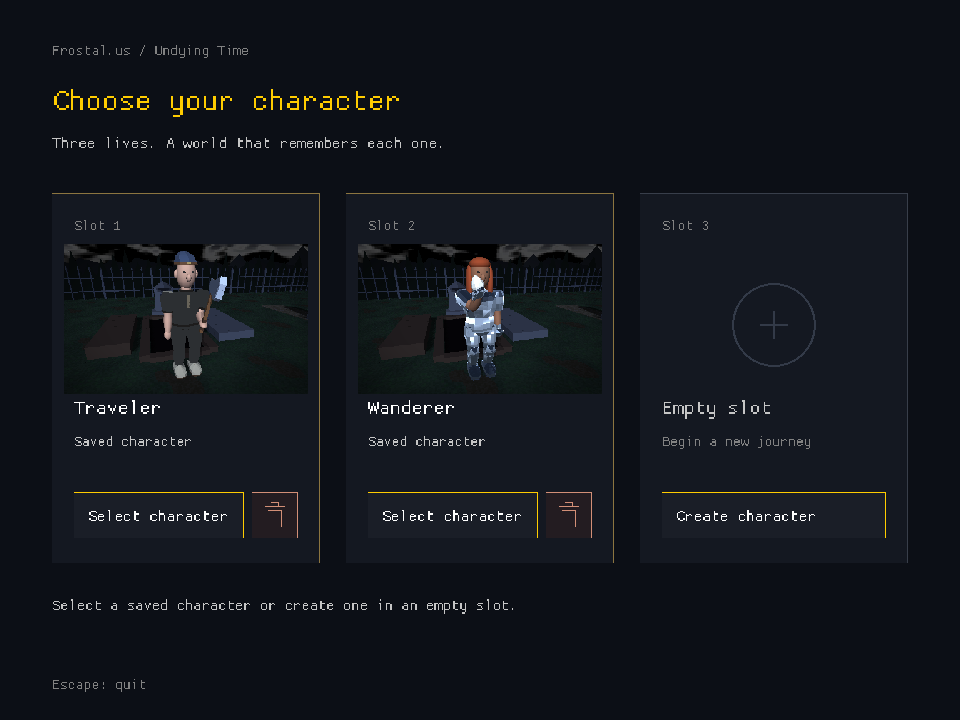
The character-selection screen now brings together up to three saved characters on your account. Portraits make it easier to recognize who you are returning to, and an empty slot lets you create a new character. Character deletion has a confirmation step.
A guide for your first steps
New characters get a first-play guide covering movement, looking around, changing camera view, opening your inventory, and finding, equipping, and using an axe. Character setup and tutorial completion are saved, so finishing those steps is not something you need to repeat every time you sign in.
A steadier world
Chicken motion and thrown-projectile presentation have been refined, alongside improvements to inventory synchronization and session handoff. The normal reliable connection remains available when the optional motion connection is unavailable.
Ready to return?
Open Undying Time in Frostal.us Launcher, install the available update, then choose Play. Use the current game client so it can connect to the matching server.
Welcome to Undying Time’s dedicated update feed. Future patch notes will appear here in the launcher.
#undying-time #patch-notes